TRP Voice Webphone Unregistered Status in Microsoft Edge
✅ Solution: Disable Tracking Prevention for the Site
To resolve the issue:
In Microsoft Edge, visit the TRP Voice webphone portal
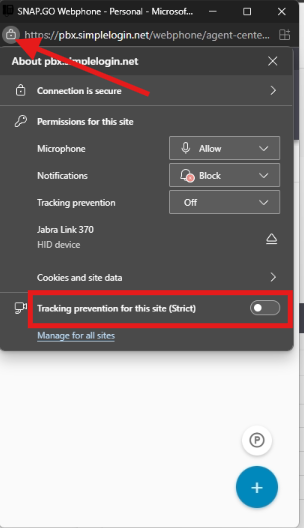
Click the lock icon to the left of the address bar.
In the site permissions panel that appears, scroll to "Tracking prevention for this site (Strict)".
Toggle the switch to off disable tracking prevention for this site.
Refresh the page or restart your browser if necessary
Note: This guide applies specifically to Microsoft Edge. While similar behavior may occur in Google Chrome, the steps and terminology may differ slightly.
Related Articles
TRP vFax Security Details
TRP vFax: Industry-Leading Security Standards TRP vFax is built for secure and compliant faxing, meeting or exceeding the strict requirements of HIPAA, GLBA, SOX, and PCI. By leveraging the Google Security Model, TRP vFax employs the same ...TRP vFax User Guide
TRP vFax User GuideMicrosoft 365 - Manage Email Signatures in Outlook Web Browser Version
How to Add an Email Signature in Outlook Web Guide for Microsoft 365 Licensed Users Knowledge Base (KB) — TRP Communications Overview This guide walks you through the step-by-step process of creating and configuring an email signature in Outlook Web ...Hosted PBX User Guide
Applies to TRP Voice and CT Cloud systems Hosted PBX User GuideUnderstanding the Agent Availability Chart
For call center supervisors, evaluating an agent's performance begins with understanding their current activities. Supervisors rarely have the time to physically check on each agent's status—whether they're logged in, on a break, or unavailable for ...